Welcome Back

Log in with your Tip Science app email & PIN.

Don't have an account? Sign up free

The science behind serious earnings

Fortune 500 companies spend millions on A/B split testing. We brought that same proven method to webcam modeling — and it works every single time.

What is A/B Split Testing?

A/B testing is simple: you try two different approaches, measure the results, and keep the winner. It's how Amazon, Netflix, and every major company optimize their revenue. Now you can use the same method in your shows.

Example: Testing Your Lighting

Show A

Warm pink lighting, ring light at 45 degrees

$85 in tips

VS

Show B

Cool white lighting, overhead softbox

$142 in tips

Result: Show B's lighting setup earned 67% more. Now you know. Keep the winner, test the next variable.

How you use the app during a show

The app is designed for zero interruption. You tap once between natural stage transitions — it takes literally a few seconds.

1

Start Your Session

Open the app, pick the stages you plan to do today, and tap "Start Session." That's it — your show is being tracked.

2

Tap When You Transition

Moving from warmup chat to teasing? Tap to close the current stage. The app asks a few quick questions: pose, lighting, camera angle, any props. Takes 5-10 seconds.

3

Note Your Viewers & Followers

At each stage close, enter the current viewer count and new followers. This helps the app correlate what you're doing with audience engagement.

4

End Your Session

When your show ends, enter your total tips and final follower count. The app does the rest — analyzing what worked and what didn't.

5

Review & Optimize

After a few shows, check your analytics. You'll see clear patterns: which lighting setup, pose, or stage order drives the most tips. Then double down.

What the app tracks at each stage

Every stage of every show captures the variables that matter. Over time, patterns emerge that tell you exactly what makes you money.

🎨
Pose / Position

Standing, sitting, lying down — which gets the most engagement?

💡
Lighting Setup

Ring light, natural, colored LEDs — test what your audience responds to.

🎥
Camera Angle

Close-up, full body, overhead — find your most profitable angles.

🎉
Props & Outfits

Toys, costumes, accessories — see which props drive tips.

👥
Viewer Count

Track how your audience grows or shrinks through each stage.

💰
Tips & Followers

The bottom line: which combinations put the most money in your pocket.
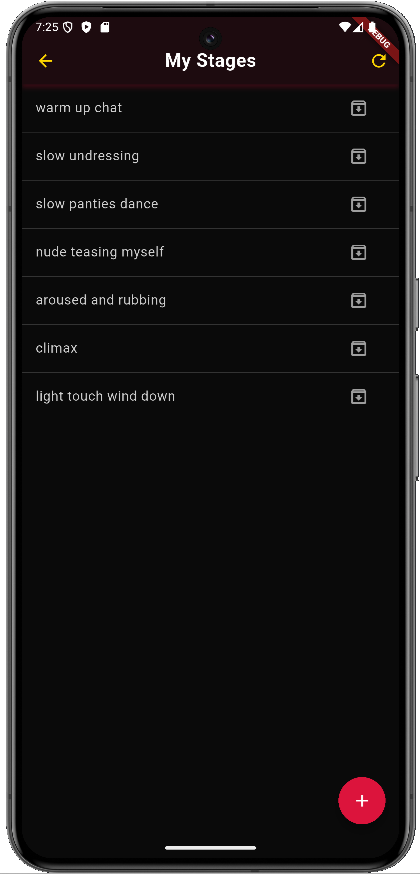
Tip Science app stage tracking screen

What to expect

📅

Days 1-3

Start tracking your shows. Just get comfortable with the app — tap between stages and note what you're doing. Your data starts building.

📈

Week 1-2

Patterns emerge. You'll see which stages, lighting, and poses consistently earn more. Start A/B testing the top performers against new ideas.

💰

Month 1+

Your optimized routine is dialed in. You know exactly what works. Models who stick with it consistently earn like professionals — hundreds per day.

Ready to stop guessing?

Join Tip Science today — it's completely free. Start tracking your shows and watch your earnings transform.